1. Why Made-Up Prompt Lists Mislead
I have seen AI visibility dashboards that look impressive at first glance. A clean chart. A green trend line. A score that goes up every week. Then you look at the prompts driving that score. They are the kind of prompts a person sitting in a product meeting might invent. «Best travel deals 2025.» «How to book a cheap flight.» «Things to do in Europe.»
Nobody searched those exact strings in any meaningful volume. They were guesses. Well intentioned guesses, but guesses nonetheless. The dashboard reported visibility on prompts that had no real demand. That is a vanity set.
The problem is structural. AI visibility is a new discipline. The tools are young. The temptation is to start with a brainstormed list because it feels productive. You write down every question a customer might ask. You cluster them by theme. You feed them into a crawler or an API. You get a report. And the report tells you something, but not the right thing. It tells you how visible you are for prompts you invented, not for prompts that real users actually type.
A vanity prompt set creates false confidence. A high visibility score on invented prompts means nothing. Worse, it can hide the gaps that matter. If you are visible for «best travel booking site» (which nobody searches) but invisible for «cancel my hotel booking because of a hurricane» (which people search all the time), your dashboard says everything is fine. It is not fine.
The fix is uncomfortable. You have to throw away most of your initial list. You have to start from evidence. And you have to accept that some products will have a short prompt list, because the data says so.
2. Evidence-Only Prompt Generation
I started building prompt sets the same way everyone does. I collected every question I could think of. Then I cut most of them.
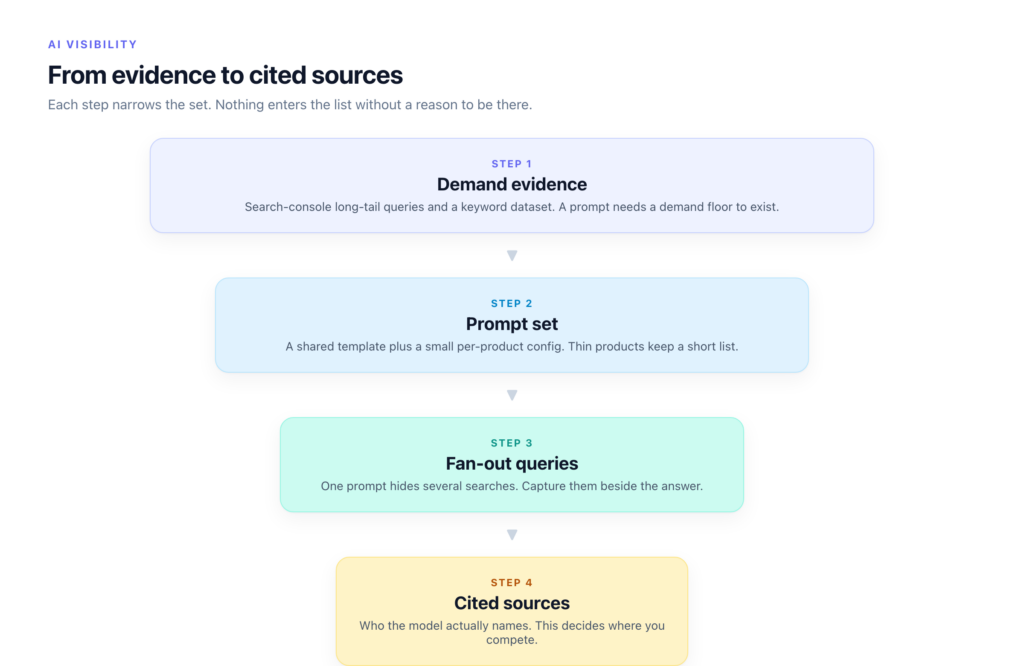
The rule is simple. Every prompt must trace back to real search data. No invented queries. No hypotheticals. No «what if someone asks this.» If there is no evidence of demand, the prompt does not make the list.
The seed comes from two places. The first is search console long-tail queries. These are the actual strings people typed that led to your pages. They are not always clean. They are not always grammatical. But they are real. You aggregate them, deduplicate them, and normalize the spelling. What remains is a list of things people actually wanted to know.
The second seed is a keyword dataset from a research tool. I use the same tool I use for traditional SEO. The overlap between the two sources is usually around 30 percent. The search console data tells you what people searched on your site. The keyword dataset tells you what people searched across the whole web. Both matter.
Every prompt needs a demand floor. I do not publish thresholds because they change per vertical. But the principle is fixed. If the evidence does not cross a minimum bar of volume or frequency, the prompt is discarded. A prompt with one impression in six months is not a prompt. It is noise.
The prompts per product come from one shared template plus a small config per product. The template defines the question types: comparison, troubleshooting, how-to, pricing, policy. The config per product adds the specific nouns and verbs that apply. A hotel product gets questions about cancellation and check-in times. A tour product gets questions about duration and meeting points. The template stays the same. The nouns change.
If a product has little evidence, the list stays short. That is uncomfortable but honest. A product with only three real queries gets three prompts. Padding it with invented ones would make the score look better and the data worse. I learned to resist that urge.
3. Fan-Out Queries Are the Real Unit
Here is something I missed the first time. A single prompt triggers several hidden searches inside the model.
You type «compare hotel and hostel prices in Barcelona.» The model does not answer from one retrieval. It may search for hotel prices in Barcelona. It may search for hostel prices in Barcelona. It may search for budget accommodation Barcelona. It may search for average nightly rate Barcelona September. Each of those is a separate query, sent to the index, ranked, and selected from.
I call these fan-out queries. They are the real unit of measurement. The prompt is the container. The fan-out queries are the work.
Some chat interfaces expose these queries in the response stream. You can see the model searching, retrieving, and composing. When that is visible, record the fan-out queries next to the answer. They tell you what the model actually needed to know. They also tell you which sources it consulted for each sub-query.
This changes how you build your prompt set. A prompt that fans out into ten queries is more important than a prompt that fans out into one. Not because the single-query prompt is wrong, but because the multi-query prompt covers more ground. It represents a higher information need. Prioritize those.
4. Capturing Runs Honestly
Capturing AI responses sounds straightforward. You send a prompt. You record the answer. You move on. In practice, it is anything but.
The first decision is headed browser automation versus API. An API is clean. It returns structured data. It is fast. But an API answer may differ from what a user sees in the chat interface. Models can behave differently in the browser version. They can cite different sources. They can include or exclude real-time information. If you only test via API, you are measuring API visibility, not user-facing visibility.
I run both. The headed browser captures what a real user would see. The API captures the programmatic path. I compare the two. When they diverge, I investigate.
Geo-routing is the second trap. A model queried from a US IP address returns different answers than one queried from Europe or Asia. Local regulations affect what the model cites. Language models bias toward sources in the query language. If your audience is global, you must test from multiple locations. Proxies are not optional. They are the cost of entry.
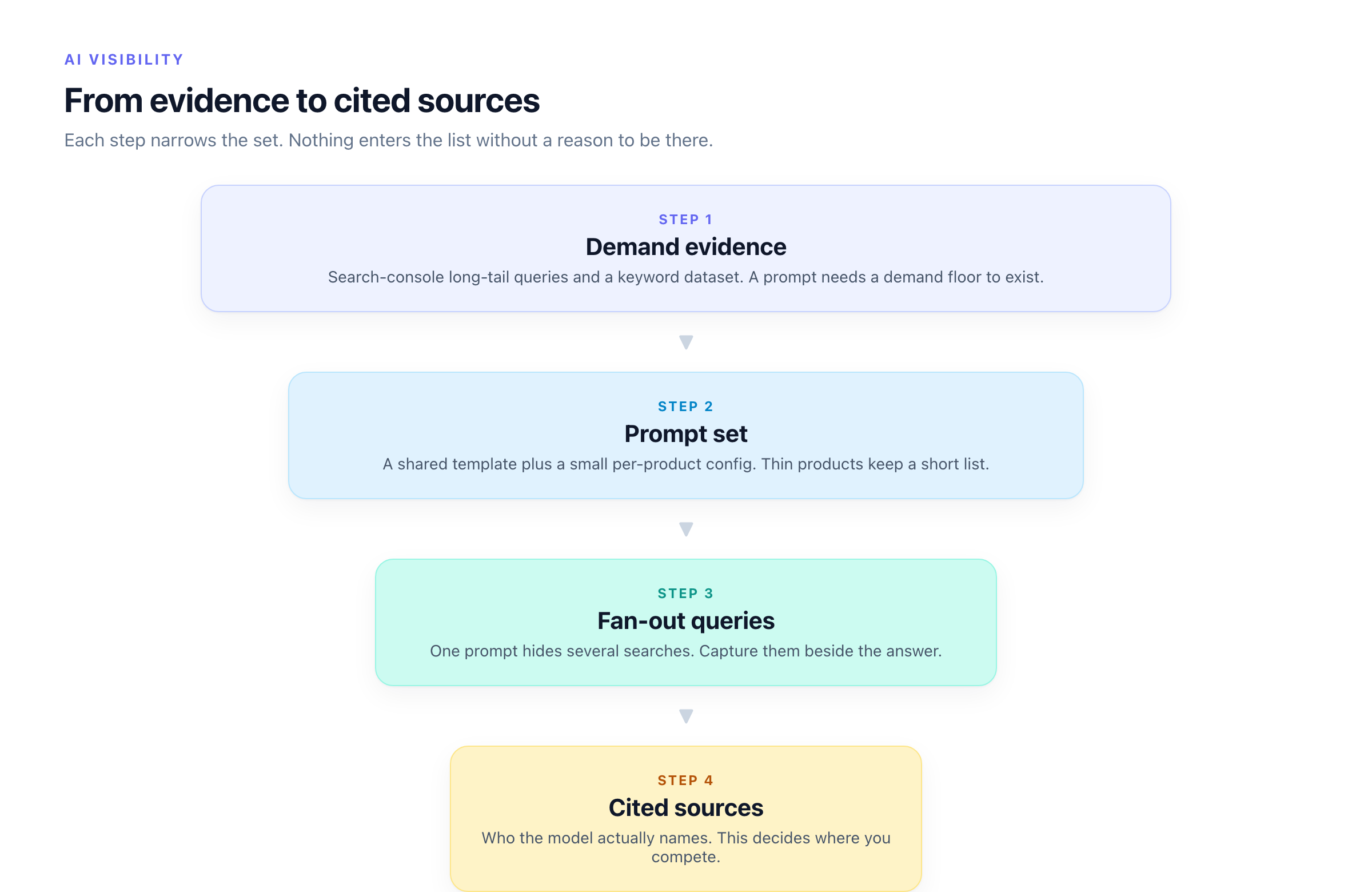
The third lesson is about snapshots versus time series. A single run tells you almost nothing. The model may have indexed fresh content that week. It may be between training cycles. It may have a caching layer that serves an older answer. One data point is a curiosity. A time series is a signal.
Every run is stored. Not as a summary. The full response, the fan-out queries, the cited sources, the timestamp, the IP location, the interface version. All of it. This is expensive in storage and processing. It is also the only way to spot changes over time.
5. Bucket Prompts by Who Gets Cited
Once you have a captured response, the next step is to look at the citations. Not just whether you were cited. Who else was cited.
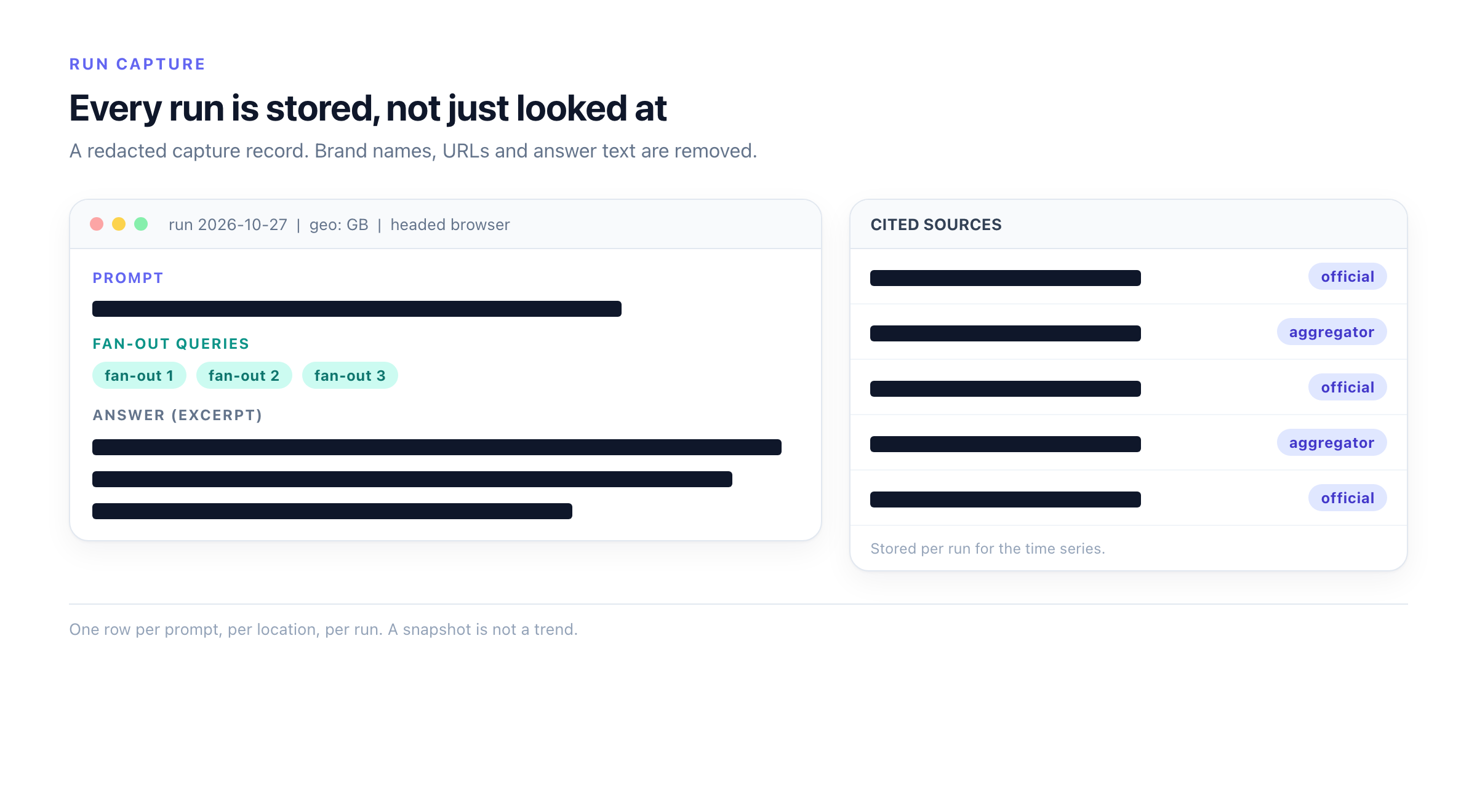
I bucket prompts into three categories.
The first bucket is official sources only. The model cites the brand, the official documentation, or the regulated authority. No aggregators. No third party reviews. This is the strongest signal. It means the model trusts the source directly.
The second bucket is official plus aggregators. The model cites the brand and also cites aggregator sites like review platforms, comparison engines, or media articles. This is mixed. The model sees you as one valid source among several.
The third bucket is aggregators only. The model cites third parties and does not cite the brand directly. This is the weakest position. The model trusts the aggregator more than the source itself.
The decision grid is straightforward. For prompts in the first bucket, you defend and invest. Your content strategy is working. Keep doing what you are doing. For prompts in the second bucket, you compete. You need to improve the content that the aggregators are winning on. For prompts in the third bucket, you either skip or change strategy entirely. The model does not see you as an authority for that query. Pouring more content into the same approach will not fix it.
I revisit the buckets every two weeks. Prompts move between them. A prompt that was aggregator only last month may shift to official plus after a content update. Or it may stay in the same bucket for months. That is fine. The buckets tell you where to spend time and where to stop.
6. Freeze, Then Expand
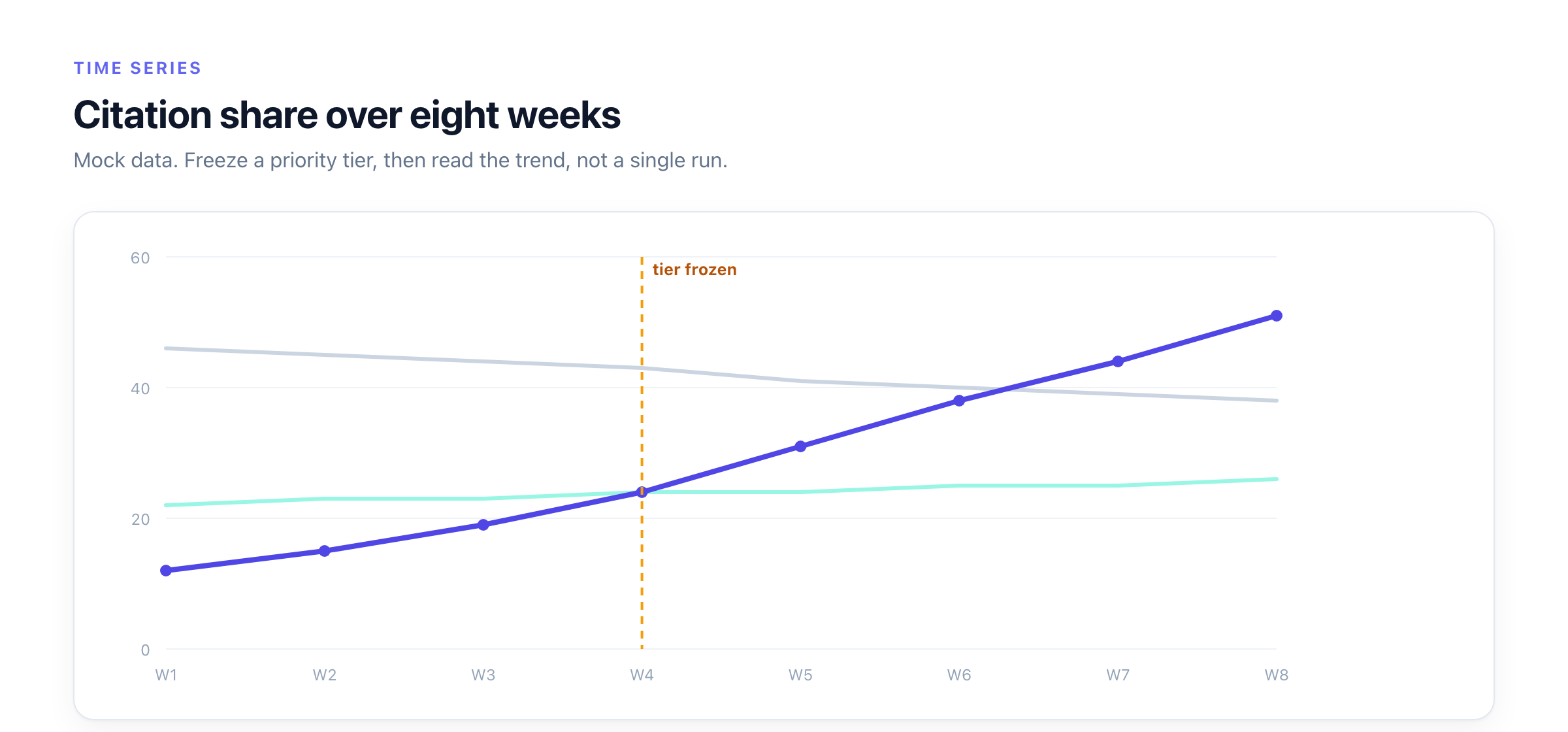
The first time I built a prompt set, I kept adding prompts. Every week I thought of a new question. Every week the list grew. It never converged. The time series was useless because the denominator changed every run.
The fix is a freeze cycle.
You lock a priority tier. This is the P0 set. Maybe thirty prompts. Maybe fifty. It depends on the product. You track those prompts for weeks. Not days. Weeks. You build a time series on a fixed set. Only after you see the trend lines stabilize do you add the next tier.
P1 prompts are the next layer. They have evidence. They fan out into several sub-queries. They matter. But they are not the core. You add them to the frozen set and restart the clock. The full set now includes P0 and P1. You track for another cycle.
P2 is the long tail. These are the prompts that barely cross the demand floor. They matter for completeness but not for trend analysis. They get added last, and only if the evidence justifies the cost of running them.
Retirement is part of the cycle too. A prompt that sat in P2 for three months without a citation change or a demand shift gets removed. The evidence that justified its inclusion is stale. Drop it. A lean prompt set is more trustworthy than a bloated one.
7. Pitfalls, and What I Would Do Differently
I made several mistakes. Some I caught early. Some I caught late. One I still catch myself doing.
The first pitfall is sampling noise. A prompt that fans out into twelve queries might hit different sources on different days. The citation count fluctuates. That is not a real change. That is noise. I learned to smooth the data with a moving average before drawing conclusions.
The second pitfall is location effects. I started by running everything from one data center. The results looked clean. Then I added a second location and the answers changed. The model cited different sources. The rankings shifted. I had to rerun everything from multiple locations and reconcile the differences. That doubled the run time and the storage cost. I should have started multi-location from day one.
The third pitfall is personalization. Models that personalize answers break reproducibility. A user who is logged in gets a different answer than an anonymous user. A user with a history of clicking certain sources gets a different mix. If your capture method does not account for personalization, your data is not comparable across runs. I now use fresh sessions for every run and log the session state.
The fourth pitfall is cost. Running a full prompt set through a headed browser from multiple locations adds up. Storage for full responses adds up. Time series data adds up. I underestimated the ongoing cost by a factor of three in the first month. Budget accordingly.
What I would do differently: start with a smaller set, freeze it earlier, and accept that the first few weeks of data are unreliable. I wanted answers too fast. The data was not ready. I acted on noise. If I were starting over, I would spend the first month just building the capture pipeline and validating the evidence. No dashboards. No decisions. Just plumbing.
8. A Starter Checklist
Here is the checklist I share with anyone starting this work.
- Pull search console long-tail queries for your top pages
- Cross-reference with a keyword research tool
- Apply a demand floor. Discard prompts below it
- Build a shared question template. Add product-specific nouns per config
- Record fan-out queries from the model response stream
- Set up headed browser capture from at least two geographic locations
- Set up API capture from the same locations
- Store full responses with timestamps, not summaries
- Bucket every prompt: official only, official plus aggregators, aggregators only
- Freeze the P0 set. Track for two weeks before adding P1
- Retire prompts that show no signal after three months
- Budget for cost. Expect to overrun in month one
That is it. Twelve items. Each one replaces a guess with evidence. The prompt set will be smaller than you want. That is the point. A smaller set that you trust is more useful than a large set you made up.